Kamai Kendra APK
Download & Guide
Explore the Kamai Kendra app, its available earning activities, key features, installation steps and important information before getting started.
⬇ Download Kamai Kendra✈ Join our Telegram channel →
Android Focused
Explore information about using and installing the application on Android devices.
Simple Activities
Learn about different tasks and reward-based activities available inside the platform.
Free Access
Read the complete guide and understand the app before deciding whether to use it.
What Is Kamai Kendra APK?
A simple introduction for new users
Kamai Kendra APK is an Android application focused on digital tasks and reward-based activities. The platform is designed for people who want to explore different ways of using their free time through a smartphone.
Depending on the activities available to an account, users may find options such as advertisements, surveys, promotional tasks, app-related activities and referral opportunities. Availability can change according to location, account and platform updates.
The application is built around a relatively simple mobile experience. Users can browse available activities, complete eligible tasks and check their account information from their device.
Why Do People Explore Kamai Kendra?
Some common reasons users look for the app
Smartphone-based reward platforms have become popular among users who want to use small amounts of spare time for online activities. Kamai Kendra is searched by users who want to learn more about task-based earning opportunities.
Instead of presenting the app as a guaranteed income source, it is better to understand how the available activities work, what requirements apply and how rewards are credited.
Key Features of Kamai Kendra APK
Main points users should know
Simple User Interface
The app is designed around a straightforward mobile interface so users can locate available sections and activities without unnecessary complexity.
Task-Based Activities
Users may find different promotional or engagement-based activities. The exact tasks can change as new campaigns become available.
Flexible Usage
There is no need to follow a traditional fixed working schedule. Users can explore eligible activities during their available free time.
Referral Opportunities
Referral-based rewards may be available for eligible users. Always check the current referral conditions before sharing an invitation.
Reward Tracking
Users can review available reward information through their account and monitor activity according to the options provided by the app.
Beginner Friendly
The basic concept is easy to understand, making it suitable for users who are exploring mobile task and reward applications for the first time.
How Does Kamai Kendra Work?
Understand the basic process before getting started
Kamai Kendra is designed around task and reward-based activities. The activities shown to a user can depend on availability, location, account eligibility and current campaigns.
In general, the process follows a simple cycle: users find an available activity, complete the required steps, and then wait for the platform to process the corresponding reward according to its rules.
Choose an Available Task
Open the app and check the activities currently available for your account. Different users may see different offers.
Complete the Required Activity
Follow the instructions shown for the selected task and complete all required actions properly.
Task Verification
Some activities may require verification before a reward is credited. Processing time can vary depending on the activity.
Check Your Reward
Once the activity is processed, check your account balance or reward history for the corresponding entry.
Use Available Withdrawal Options
If your account reaches the applicable withdrawal requirement, follow the payment instructions displayed inside the platform.
Ways to Earn Rewards on Kamai Kendra
Activities may vary depending on availability
One reason users search for Kamai Kendra APK is the variety of task-based activities. However, not every activity is necessarily available to every account. The following are common types of activities associated with reward platforms.
Watch Advertisements
Promotional videos or advertisements may be available as reward activities. If an offer is available, follow its completion requirements carefully before expecting a reward.
Complete Surveys
Some reward campaigns use surveys to collect opinions and feedback. Survey availability and reward values can vary by user and location.
Quizzes & Activities
Interactive activities such as quizzes or simple tasks may appear from time to time. Read the instructions before starting each activity.
App-Based Offers
Certain campaigns may involve trying another application or completing a specified action. Always check the exact offer conditions.
Referral Activities
Referral opportunities can provide additional rewards when eligible users join through an invitation and meet the applicable requirements.
Promotional Rewards
New promotional activities may appear during campaigns. These offers can have separate rules, eligibility requirements and expiry periods.
How to Download Kamai Kendra APK
Simple Android download instructions
If you want to try the Android application, use the download button provided on this page. Before installing an APK, make sure you understand where the file comes from and review the permissions requested by the app.
Tap the Download Button
Use the Kamai Kendra download button on this page to open the provided download destination.
Wait for the File
Allow the download to finish. Keep enough free storage space available on your Android device.
Locate the Downloaded APK
Open your phone’s Files or File Manager application and check the Downloads folder.
Review Installation Settings
Android may require permission before an APK obtained outside the Play Store can be installed. Only enable such permission when you understand the source of the file.
Install and Open
Tap the downloaded file, follow the Android installation prompts and open the application after installation is complete.
Ready to Explore Kamai Kendra?
Use the download link below to access the provided Kamai Kendra download destination.
⬇ Download Kamai KendraHow to Install Kamai Kendra on Android
Step-by-step installation guide
Installing an APK manually is slightly different from installing an application through Google Play. Follow the steps below carefully.
Download the APK
Download the available Kamai Kendra APK file using the download option provided above.
Open Android Settings
If Android blocks the installation, open the security or app-installation settings shown by your device.
Allow the Required Installation Permission
Depending on your Android version, you may need to allow installation from the browser or file manager that opened the APK.
Start Installation
Return to the downloaded APK and tap it. Select Install when Android displays the installation prompt.
Open the Application
After installation completes, open Kamai Kendra and follow the registration or login instructions shown on your device.
Can Kamai Kendra APK Run on a PC?
Using an Android emulator
An Android APK is designed primarily for Android devices. If you want to experiment with it on a Windows computer, an Android emulator may be required.
Install a Compatible Android Emulator
Choose a reputable emulator that supports the Android version required by the application.
Complete the Emulator Setup
Follow the emulator’s normal setup process and allow it to finish configuring the Android environment.
Open the APK Installation Option
Most Android emulators provide an option for installing APK files from your computer.
Select the Downloaded File
Locate the APK on your computer and select it through the emulator’s installation interface.
Launch the App
Once installation is complete, open the application from the emulator’s Android interface.
Is Kamai Kendra Available for iPhone?
Important information for iOS users
APK is an Android application package format, so an APK file cannot normally be installed directly on an iPhone or iPad.
iOS users should check the Apple App Store for an officially published version instead of attempting to install an Android APK on an iPhone.
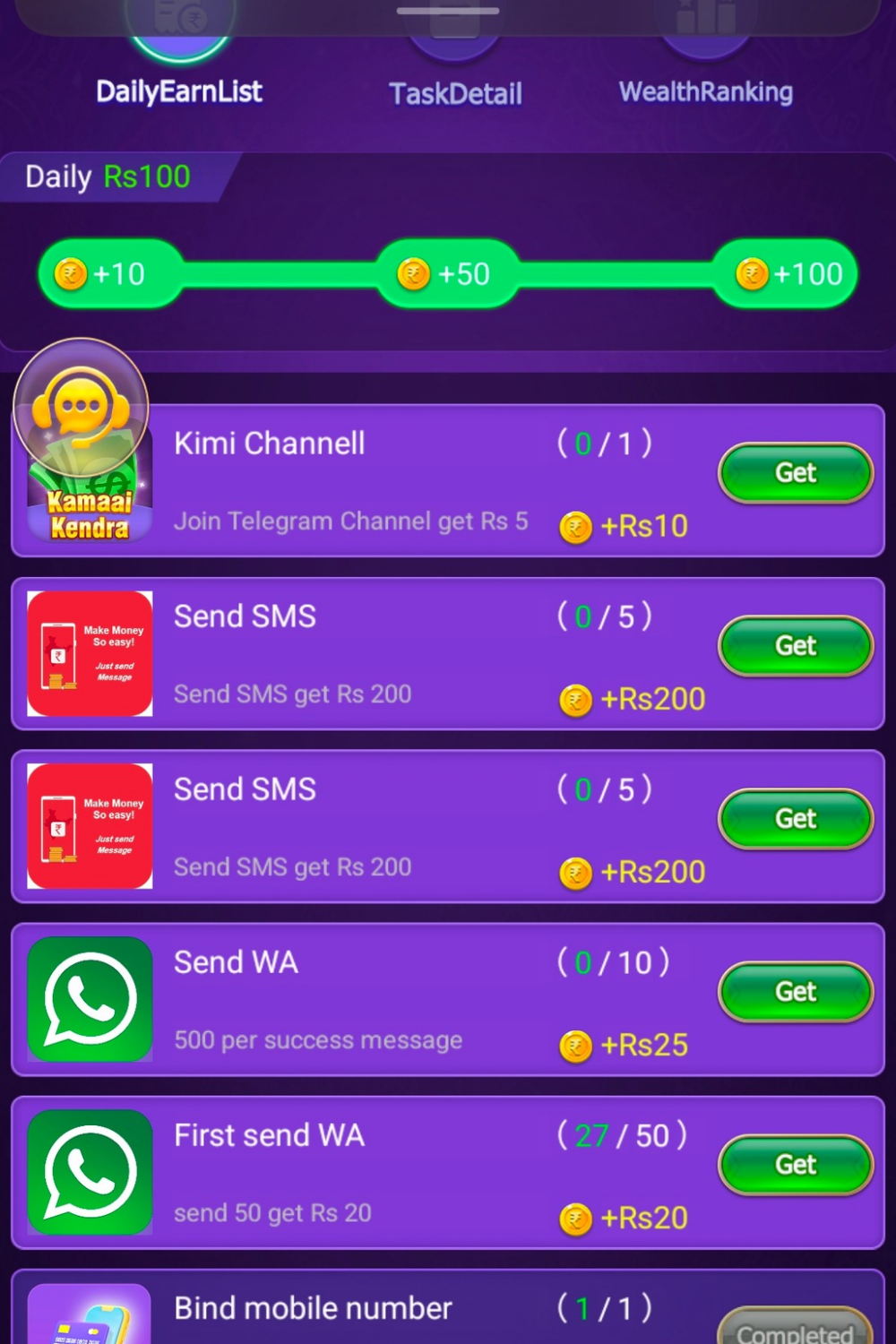
Kamai Kendra APK – Complete Information
Things to understand before using the application
Kamai Kendra APK is searched by Android users who want to explore task-based and reward-oriented activities from their smartphones. The basic idea is to complete eligible activities and receive rewards according to the rules applicable to each activity.
However, users should keep in mind that an earning application should not automatically be considered a replacement for a regular job or guaranteed source of income. The number of available tasks, reward amounts and eligibility requirements can change over time.
For this reason, it is useful to understand the app, its features, installation process and reward conditions before spending substantial time on it.
Who Can Use Kamai Kendra?
General information for new users
Kamai Kendra is primarily intended for users who want to explore mobile-based tasks and reward activities. Android users can check the available features after installing and opening the application.
Actual eligibility may depend on the application’s current requirements. Some activities can also be limited by location, account status or campaign availability.
The APK format is designed for Android devices.
Most online activities require an active connection.
Some features may require registration or login.
Available activities can vary between accounts.
Frequently Asked Questions
Common questions about Kamai Kendra APK
What is Kamai Kendra APK?
Kamai Kendra APK is an Android application focused on task-based and reward-oriented activities. Users can explore available activities through the app according to their account eligibility.
Is Kamai Kendra APK free to download?
The download option provided on this page is free to access. Users should always check the current application conditions before installing or using an APK.
Can I earn money from Kamai Kendra?
The platform may provide reward-based activities for eligible users. However, earnings are not guaranteed and can depend on available tasks, eligibility, completion requirements and applicable reward rules.
What tasks are available on Kamai Kendra?
Available activities may include advertisements, surveys, promotional activities, app-related tasks, quizzes and referral opportunities. The exact list can change over time.
Is Kamai Kendra available for Android?
Yes. APK files are intended for Android devices. Users should check Android compatibility and the application’s current requirements before installing.
Can I install Kamai Kendra on an iPhone?
APK is an Android package format and cannot normally be installed directly on an iPhone. iPhone users should look for an officially supported iOS version through the Apple App Store if one is available.
Can I use Kamai Kendra on a PC?
An Android emulator can provide an Android environment on a compatible PC. Whether the application works correctly in an emulator depends on its compatibility and current requirements.
Is Kamai Kendra a guaranteed income source?
No earning application should be presented as a guaranteed income source. Rewards can depend on task availability, eligibility, completion and platform rules.
Does Kamai Kendra require an internet connection?
Online task and reward activities generally require an active internet connection because the application needs to communicate with its online services.
Where can I get Kamai Kendra updates?
You can follow the Telegram channel linked on this page for updates and new information related to Kamai Kendra.
Kamai Kendra APK – Final Overview
Kamai Kendra is a mobile-focused platform that users can explore for task and reward-based activities. Its simple concept makes it easy for beginners to understand the basic process.
Before using any earning application, users should check the current rules, permissions, reward conditions and withdrawal requirements. Task availability and reward values can change.
Android
Earning & Rewards
Download, Installation & Features
2026
Disclaimer
Important information for visitors
Users should independently verify the application’s current terms, privacy practices, permissions and reward conditions before using it. Never share passwords, OTPs, banking PINs or other sensitive credentials with unknown persons or websites.
Explore Kamai Kendra APK
Read the guide, understand the available features and use the provided link if you decide to explore the app.